For most households, I’d start with the TP-Link Tapo P115 4-Pack: it pairs energy tracking with a useful 15A rating and enough plugs to monitor several appliances. The Kasa KP115 is a strong alternative for buyers who want a straightforward single-plug option, while the Kasa KP125M and Tapo P110M stand out for Matter compatibility. The main tradeoffs are whether you need a multi-pack, which smart-home ecosystem you use, and how much you value energy history and app features. Not every plug offers the same connection options or monitoring experience, so check compatibility before choosing. Read on for the full breakdown of all 10 picks and guidance on matching one to your setup.

Get home appliances delivered free with Prime
- Fast, free delivery on millions of items
- Prime Video, Amazon Music and more included
- Member-only deals all year
Complete the kit


Key Takeaways
- Tapo P115 is the roundup’s all-around pick: its 15A rating and four-plug bundle make it a practical starting point for monitoring multiple household devices.
- Matter support is the clearest dividing line: the Kasa KP125M models and Tapo P110M offer a route beyond relying only on each brand’s app, but buyers should verify compatibility with their specific smart-home controller.
- Pack size changes the value equation: the Tapo P115 and THIRDREALITY Gen3 come in four-packs, while the Kasa KP115 is a better fit when a buyer needs just one monitored outlet.
- Connection methods are not interchangeable: Govee combines Wi-Fi and Bluetooth, while several other listed plugs are Wi-Fi-focused; choose based on setup needs rather than assuming every plug behaves alike.
- Energy monitoring does not make every plug suitable for every appliance: the listed 15A models provide a clear capacity reference, but buyers should still check the appliance load and manufacturer guidance.
| TP-Link Tapo P115 Smart Wi-Fi Plug with Energy Monitoring, 4-Pack, 15A | 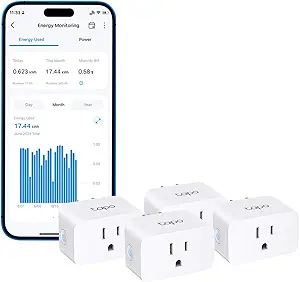 | Best Overall | Model: P115 | Pack size: 4 plugs | Connectivity: Wi-Fi | VIEW LATEST PRICE | See Our Full Breakdown |
| THIRDREALITY Smart Plug Gen3, 4-Pack, with Power Monitoring |  | Best for Zigbee Setups | Pack size: 4 plugs | Connectivity: Zigbee 3.0 | Operating voltage: 110 V | VIEW LATEST PRICE | See Our Full Breakdown |
| Kasa Smart Plug Mini with Energy Monitoring (KP115) |  | Best for Safety-Conscious Beginners | Model: KP115 | Connectivity: 2.4 GHz Wi-Fi | Energy monitoring: Yes | VIEW LATEST PRICE | See Our Full Breakdown |
| TP-Link Tapo P115 Smart Plug with Energy Monitoring, 15A, 2-Pack |  | Best for Small Setups | Model: P115 | Quantity: 2 plugs | Maximum current: 15A | VIEW LATEST PRICE | See Our Full Breakdown |
| Smart Plug with Energy Monitoring, 15A, 2.4 GHz Wi-Fi, 4-Pack |  | Best Value-Oriented Feature Set | Pack size: 4 plugs | Maximum current: 15A | Power capacity: 1800W | VIEW LATEST PRICE | See Our Full Breakdown |
| Govee Smart Plug with Energy Monitoring, Wi-Fi and Bluetooth, 4-Pack |  | Best for Long-Term Energy Tracking | Pack size: 4 plugs | Connectivity: Wi-Fi and Bluetooth | Wi-Fi compatibility: Does not support 5 GHz Wi-Fi | VIEW LATEST PRICE | See Our Full Breakdown |
| Emporia Energy Monitoring Smart Plug, 4-Pack |  | Best for Straightforward Appliance Scheduling | Pack size: 4 plugs | Maximum continuous load: 10 A | Maximum peak load: 15 A for up to 1 hour per day | VIEW LATEST PRICE | See Our Full Breakdown |
| Kasa Matter Smart Plug with Energy Monitoring, KP125MP2, 15A/1800W |  | Best Compact Matter Plug | Model: KP125MP2 | Maximum current: 15 A | Maximum power: 1800 W | VIEW LATEST PRICE | See Our Full Breakdown |
| Tapo P110M Matter-Compatible Smart Plug with Energy Monitoring, 4-Pack, 15A |  | Best for Multi-Platform Power Management | Model: P110M | Pack size: 4 plugs | Maximum current: 15 A | VIEW LATEST PRICE | See Our Full Breakdown |
| Kasa Matter Smart Plug with Energy Monitoring, KP125M, 15A/1800W |  | Best for Matter Local Control | Model: KP125MP4 (title model: KP125M) | Maximum load: 15 A / 1800 W | Connectivity: Matter over Wi-Fi | VIEW LATEST PRICE | See Our Full Breakdown |
| smart plugs with energy monitoring | Connectivity | Energy monitoring | Model | Pack size |
|---|---|---|---|---|
| TP-Link Tapo P115 Smart Wi-Fi | Wi-Fi | Yes; statistics and charts | P115 | 4 plugs |
| THIRDREALITY Smart Plug Gen3 | Zigbee 3.0 | — | — | 4 plugs |
| Kasa Smart Plug Mini with Ener | 2.4 GHz Wi-Fi | Yes | KP115 | — |
| TP-Link Tapo P115 Smart Plug w | — | Yes; usage statistics and charts | P115 | — |
| Smart Plug with Energy Monitor | 2.4 GHz Wi-Fi | Real-time power and energy use | — | 4 plugs |
| Govee Smart Plug with Energy M | Wi-Fi and Bluetooth | Power, current, and voltage | — | 4 plugs |
| Emporia Energy Monitoring Smar | 2.4 GHz Wi-Fi; 5 GHz not supported | — | — | 4 plugs |
| Kasa Matter Smart Plug with En | Matter and Wi-Fi | Yes; tracks energy use over time | KP125MP2 | — |
| Tapo P110M Matter-Compatible S | — | Yes; usage tracking and statistics | P110M | 4 plugs |
| Kasa Matter Smart Plug with En | Matter over Wi-Fi | Yes; tracks energy usage over time | KP125MP4 (title model: KP125M) | — |
More Details on Our Top Picks
TP-Link Tapo P115 Smart Wi-Fi Plug with Energy Monitoring, 4-Pack, 15A
I’d choose the Tapo P115 4-pack for a household that wants energy tracking alongside practical everyday automation. Its usage statistics and charts help compare connected appliances, while schedules and app control make it easy to switch devices on or off when away. Configurable charging limits and automatic overload shutoff add safeguards that are not listed for the SmartLife 4-pack. Both use Wi-Fi and support Alexa and Google Assistant, but Tapo puts monitoring and controls in its own app without requiring a separate hub. The tradeoff is that energy-cost visualization needs billing-system integration, so usage data may take extra setup to translate into an estimated bill. I’d rank it ahead of the two-plug Tapo version for buyers who want four monitored outlets at once.
Pros:- Shows energy use through statistics and charts
- Supports scheduling and remote control through the Tapo app
- Works with Amazon Alexa and Google Assistant
- Includes configurable charging limits and automatic overload shutoff
Cons:- Energy-cost visualization requires billing-system integration
- A four-plug pack may be more than needed for smaller setups
Best for: Households that want four Wi-Fi energy-monitoring plugs with scheduling, voice control, and overload shutoff in one app.
Not ideal for: Buyers who want energy costs calculated without linking billing information, or who only need one or two plugs.
- Model:P115
- Pack size:4 plugs
- Connectivity:Wi-Fi
- Energy monitoring:Yes; statistics and charts
- Voice assistants:Amazon Alexa, Google Assistant
- Remote control:Tapo app
- Scheduling:Yes
- Overload protection:Automatic shutoff
Our verdict“Choose this four-pack for a balanced set of monitoring and automation features, provided the billing integration requirement suits you.”
THIRDREALITY Smart Plug Gen3, 4-Pack, with Power Monitoring
The THIRDREALITY Gen3 is the specialist pick here: its Zigbee 3.0 connection suits buyers who already have a compatible hub and want monitored plugs to contribute to mesh coverage. The stated ±1% power-monitoring accuracy gives it a clear measurement-focused distinction from the Wi-Fi Tapo P115, though the products’ figures should not be read as a direct head-to-head test. Its compact, adjacent-socket-conscious shape can also help when a bulky plug would block a nearby outlet. The main compromise is setup dependence: a compatible Zigbee hub is required, unlike the hub-free SmartLife four-pack. Power-on status restoration also depends on the platform, so I’d check that behavior against a buyer’s existing system before choosing these for equipment that needs a predictable restart.
Pros:- Power monitoring with a stated ±1% accuracy
- Can extend Zigbee mesh coverage
- Compatible with several hubs and smart-home platforms
- Compact design intended to avoid blocking adjacent sockets
Cons:- Requires a compatible Zigbee hub
- Power-on status restoration is available only on select platforms
Best for: Smart-home owners with a compatible Zigbee hub who want power monitoring and additional mesh coverage from a four-pack.
Not ideal for: People building a hub-free Wi-Fi setup, or buyers who need consistent power-on restoration across platforms.
- Pack size:4 plugs
- Connectivity:Zigbee 3.0
- Operating voltage:110 V
- Power-monitoring accuracy:±1% stated
- Operation mode:On-off
- Control methods:Remote and voice
- Hub required:Yes
- Mounting type:Plug-in
Our verdict“Pick the THIRDREALITY four-pack if you already use Zigbee and value stated monitoring accuracy over hub-free setup.”
Kasa Smart Plug Mini with Energy Monitoring (KP115)
I’d steer first-time buyers toward the Kasa KP115 if their priorities are familiar app and voice control plus clearly specified safety features. It monitors energy use and supports remote operation through the Kasa app, while overheating protection, a fire-resistant shell, and a child safety cover make its protections a more prominent part of the choice than on the Tapo P115 listing. UL certification and a two-year warranty add concrete product information for cautious shoppers. Compared with the THIRDREALITY Gen3, setup is less dependent on smart-home infrastructure because this model uses 2.4 GHz Wi-Fi rather than requiring a Zigbee hub. That simplicity comes with a network limitation: it needs a 2.4 GHz connection, and the supplied details don’t specify chart-based reporting or a pack size.
Pros:- Energy monitoring with Kasa app and voice control
- Supports remote control through the Kasa app
- Includes overheating protection, a fire-resistant shell, and a child safety cover
- UL certified and backed by a two-year warranty
Cons:- Requires a 2.4 GHz Wi-Fi connection
- The provided product details do not specify a pack size or monitoring-chart format
Best for: First-time smart-plug buyers who want energy monitoring, familiar Alexa or Google Assistant control, and clearly listed safety protections.
Not ideal for: Households without a 2.4 GHz Wi-Fi network, or buyers specifically seeking a multi-plug bundle or Zigbee integration.
- Model:KP115
- Connectivity:2.4 GHz Wi-Fi
- Energy monitoring:Yes
- Voice assistants:Amazon Alexa, Google Assistant
- Control:Kasa app and voice
- Safety features:Overheating protection, fire-resistant shell, child safety cover
- Certification:UL certified
- Warranty:2 years
Our verdict“Choose the KP115 if app-based monitoring and explicit safety features matter more than Zigbee support or a specified multi-pack.”
TP-Link Tapo P115 Smart Plug with Energy Monitoring, 15A, 2-Pack
For buyers monitoring just a couple of appliances, the Tapo P115 2-pack keeps the same core feature set as its four-plug sibling without asking for extra outlets. You still get usage statistics and charts, remote Tapo app control, schedules, Alexa and Google Assistant support, and automatic overload shutoff. The listed 15A maximum current gives buyers a clear capacity figure when checking whether a connected device is suitable. Compared with the Tapo P115 4-pack, the difference is chiefly the number of plugs, not a separate monitoring platform or automation approach. One limitation applies to both: energy-bill cost visualization needs billing-system integration. Charging cutoff also requires setting a low-battery limit, so buyers expecting an automatic charging feature with no configuration should look elsewhere.
Pros:- Includes energy-use statistics and charts
- Offers Tapo app control, scheduling, and Alexa and Google Assistant compatibility
- Automatic overload shutoff is supported
- 15A maximum current is specified
Cons:- Energy-bill cost visualization requires billing-system integration
- Smart charging cutoff requires setting a low-battery limit
Best for: People who want to monitor and schedule one or two appliances, such as a desk setup or a pair of household devices.
Not ideal for: Buyers outfitting several rooms, or anyone expecting charging cutoff to work without setting a low-battery limit.
- Model:P115
- Quantity:2 plugs
- Maximum current:15A
- Energy monitoring:Yes; usage statistics and charts
- Voice assistants:Amazon Alexa, Google Assistant
- Remote control:Tapo app
- Scheduling:Yes
- Overload shutoff:Yes
Our verdict“Choose this two-pack over the four-pack Tapo version when two monitored outlets cover your needs and you want its same core controls.”
Smart Plug with Energy Monitoring, 15A, 2.4 GHz Wi-Fi, 4-Pack
The SmartLife four-pack is a practical match for buyers who want several monitored outlets, group controls, and no separate hub. It reports real-time power and energy use, while schedules and timers cover routine automation; group control can manage multiple plugs together rather than one at a time. Its 15A, 1800W capacity is clearly stated, and the listed fire-resistant materials plus short-circuit and overload protection add useful safety detail. Compared with the Tapo P115 four-pack, it offers group control and a stated 1800W capacity, while Tapo specifically lists usage charts and configurable charging limits. The SmartLife model’s main catch is ecosystem setup: Alexa control must be linked through the app, not connected directly, and it requires 2.4 GHz Wi-Fi.
Pros:- Tracks real-time power and energy use
- Supports schedules, timers, and group controls through SmartLife
- Four plugs operate without a separate hub
- Lists 15A, 1800W capacity and short-circuit and overload protection
Cons:- Requires a 2.4 GHz Wi-Fi connection
- Alexa control requires linking through SmartLife rather than a direct connection
Best for: Buyers who want four hub-free plugs for real-time monitoring, timers, and managing several devices as a group.
Not ideal for: People seeking direct Alexa setup, a 5 GHz Wi-Fi connection, or Tapo-style usage charts and configurable charging limits.
- Pack size:4 plugs
- Maximum current:15A
- Power capacity:1800W
- Connectivity:2.4 GHz Wi-Fi
- App:SmartLife
- Energy monitoring:Real-time power and energy use
- Hub required:No
- Safety features:FCC certified; fire-resistant materials; short-circuit and overload protection
Our verdict“Pick this four-pack for hub-free group control and real-time monitoring if app-linked voice setup is acceptable.”
Govee Smart Plug with Energy Monitoring, Wi-Fi and Bluetooth, 4-Pack
The Govee stands out for buyers who want to compare a device’s energy use across seasons or changing routines: its app records power, current, and voltage, with history available for up to one year. That longer record gives it a tracking advantage over the Emporia 4-Pack, whose supplied details do not specify how long data is retained. You also get remote, voice, scheduled, and group control, so monitoring does not come at the cost of everyday convenience. The four-plug set suits several rooms or appliances, while its 15 A, 120 V rating covers many typical plug-in devices. The tradeoff is network flexibility: it supports Wi-Fi and Bluetooth but not 5 GHz Wi-Fi, so it is a poor fit for households relying on a 5 GHz-only network.
Pros:- Tracks power, current, and voltage in the Govee Home app
- Provides historical energy data for up to one year
- Supports remote, voice, scheduled, and group control
- Four plugs and FCC and ETL certifications are included
Cons:- Does not support 5 GHz Wi-Fi
- Supplied details do not state a wattage limit
- Energy monitoring and control depend on the Govee app and compatible network
Best for: Households that want a four-plug set and year-long energy records to compare usage over time.
Not ideal for: People whose available Wi-Fi network is 5 GHz-only, or buyers who need a stated wattage limit before choosing an appliance plug.
- Pack size:4 plugs
- Connectivity:Wi-Fi and Bluetooth
- Wi-Fi compatibility:Does not support 5 GHz Wi-Fi
- Energy monitoring:Power, current, and voltage
- Data history:Up to 1 year
- Voice assistants:Amazon Alexa and Google Assistant
- Certifications:FCC and ETL
Our verdict“Choose the Govee if long-term energy history across several outlets matters more than 5 GHz Wi-Fi support.”
Emporia Energy Monitoring Smart Plug, 4-Pack
The Emporia is a practical pick for buyers who want to track plug-in appliance use and add schedules without needing a Matter setup. Its app monitoring and scheduling can help spot standby consumption and automate shutoff times, while Alexa and Google Assistant add familiar voice control. Compared with the Govee four-pack, Emporia’s supplied specs give a clearer load caveat: it allows 10 A continuous, with a 15 A peak load permitted for up to one hour per day. That makes appliance matching especially important. It also lists touch and push-button control alongside app and voice options, handy when a phone is not close by. The main compromise is the lower continuous limit, plus its requirement for 2.4 GHz Wi-Fi; buyers with 5 GHz-only networks should look elsewhere.
Pros:- Monitors connected-device energy use
- Schedules can automate on and off times
- Supports Alexa and Google Assistant
- Offers app, remote, touch, voice, and push-button control
Cons:- Maximum continuous load is 10 A
- 15 A peak load is limited to up to one hour per day
- Does not support 5 GHz Wi-Fi
Best for: People automating lights and moderate-load 120 V appliances who want scheduling, energy tracking, and physical controls.
Not ideal for: Buyers with appliances that draw more than 10 A continuously, or homes without a 2.4 GHz Wi-Fi network.
- Pack size:4 plugs
- Maximum continuous load:10 A
- Maximum peak load:15 A for up to 1 hour per day
- Operating voltage:120 V
- Wattage:1200 W
- Connectivity:2.4 GHz Wi-Fi; 5 GHz not supported
- Compatible assistants:Amazon Alexa and Google Assistant
- Control methods:App, remote, touch, voice, and push button
Our verdict“Pick Emporia for routine scheduling and multiple control options, provided your appliance stays within its 10 A continuous limit.”
Kasa Matter Smart Plug with Energy Monitoring, KP125MP2, 15A/1800W
This Kasa is the clearest fit for buyers who need Matter compatibility in a compact plug. It supports Apple Home, Alexa, Google Home, and SmartThings, and local network control lets compatible Matter devices respond without relying on an internet connection. Its compact design can also leave a neighboring outlet usable, a useful day-to-day advantage over bulkier plugs. Compared with the Tapo P110M four-pack, the KP125MP2 is a more natural choice when a small footprint and a stated 1800 W capacity matter more than buying several plugs at once. Energy monitoring tracks usage over time, though the supplied information does not detail a long-term history window or automatic shutoff thresholds like Tapo’s. App control still needs Wi-Fi, and voice control depends on a compatible assistant.
Pros:- Works with Apple Home, Amazon Alexa, Google Home, and SmartThings through Matter
- Local network control can keep compatible Matter devices working when internet is offline
- Compact design helps preserve access to an adjacent outlet
- Rated for 15 A and 1800 W, with a 2-year limited warranty
Cons:- App control requires Wi-Fi connectivity
- Voice control depends on a supported smart assistant
- Supplied details do not state an energy-history duration or automatic shutoff feature
Best for: Matter households that need one or more compact energy-monitoring plugs for standard outlets and want local network control.
Not ideal for: Shoppers who need a multi-plug bundle, automatic power shutoff thresholds, or app control without Wi-Fi.
- Model:KP125MP2
- Maximum current:15 A
- Maximum power:1800 W
- Connectivity:Matter and Wi-Fi
- Energy monitoring:Yes; tracks energy use over time
- Compatible platforms:Apple Home, Amazon Alexa, Google Home, Samsung SmartThings
- Safety design:UL-certified flame-retardant design
- Warranty:2-year limited warranty
Our verdict“Choose this Kasa for a compact Matter plug with monitoring and local control, rather than a multi-pack with richer stated power-management tools.”
Tapo P110M Matter-Compatible Smart Plug with Energy Monitoring, 4-Pack, 15A
The Tapo P110M earns its place for buyers who want several monitored outlets and more than basic on/off automation. Its four plugs support Matter and major smart-home platforms, while energy tracking, schedules, remote control, and configurable automatic shutoff thresholds give you more ways to respond to usage. That shutoff option is a meaningful distinction from the Kasa KP125MP2, whose supplied features focus on monitoring and local control rather than a stated power threshold. At 15 A, the Tapo is specified for a standard full-load smart plug, and the Tapo app handles remote control. One limitation: turning energy figures into bill-cost estimates requires integration with billing systems, so raw usage data may be less immediately useful for buyers focused on household costs. Choose it for control breadth, not automatic bill math.
Pros:- Four plugs support multiple rooms or appliances
- Matter compatibility spans Alexa, Apple HomeKit, Google Home, and SmartThings
- Combines energy tracking with schedules, remote control, and voice control
- Configurable automatic power shutoff thresholds add a control option beyond monitoring
Cons:- Energy bill cost visualization requires integration with billing systems
- Supplied details do not specify a history-retention period
- Remote control uses the Tapo app
Best for: Smart-home users who want four Matter-compatible monitored outlets and configurable power shutoff for appliances.
Not ideal for: Buyers who expect the app to calculate energy costs directly without connecting billing-system information.
- Model:P110M
- Pack size:4 plugs
- Maximum current:15 A
- Connectivity standard:Matter
- Energy monitoring:Yes; usage tracking and statistics
- Compatible platforms:Amazon Alexa, Apple HomeKit, Google Home, Samsung SmartThings
- Remote control:Tapo app
- Scheduling:Programmable
Our verdict“Choose the Tapo P110M if you want a four-pack with broad Matter support and automatic power thresholds, rather than simple usage tracking alone.”
Kasa Matter Smart Plug with Energy Monitoring, KP125M, 15A/1800W
The KP125M is aimed at buyers who value local control when the internet is down and want energy monitoring in a Matter-based home. It works with Apple Home, Alexa, Google Home, and SmartThings, and its compact shape can help keep the adjacent outlet accessible. Compared with the Tapo P110M four-pack, this Kasa is a more focused choice for local network operation rather than a bundle with stated automatic power shutoff thresholds. The 15 A/1800 W rating suits many standard plug-in devices, but it is still a firm ceiling: check an appliance’s draw before connecting it. Local control also depends on compatible Matter devices sharing the network, so it is not an automatic fallback for every setup. Monitoring is included, though the supplied details do not specify data-history length.
Pros:- Matter works with Apple Home, Amazon Alexa, Google Home, and SmartThings
- Local control can continue when internet is offline if compatible devices share the network
- Tracks energy usage over time
- Compact design helps avoid blocking nearby outlets
Cons:- Local control requires compatible Matter devices on the same network
- Maximum load is limited to 15 A and 1800 W
- Supplied details do not specify how long energy data is retained
Best for: People building a Matter smart home who want a compact monitored plug and local device control during internet outages.
Not ideal for: Households without compatible Matter devices on the same network, or buyers seeking a four-plug kit or stated automatic shutoff thresholds.
- Model:KP125MP4 (title model: KP125M)
- Maximum load:15 A / 1800 W
- Connectivity:Matter over Wi-Fi
- Compatible platforms:Apple Home, Amazon Alexa, Google Home, Samsung SmartThings
- Energy monitoring:Yes; tracks energy usage over time
- Safety:UL-certified flame-retardant design
- Warranty:2-year limited warranty
Our verdict“Pick the KP125M for compact Matter-based monitoring with local control, as long as your devices share a network and stay within its load limit.”

How We Picked
I ranked these smart plugs with energy monitoring by how well they balance useful power tracking with dependable day-to-day control. I weighed stated electrical capacity, the clarity of each product’s connectivity and ecosystem positioning, pack size, and whether the choice makes sense for one outlet or several. I also treated ease of setup and the likely usefulness of app-based monitoring as buyer concerns, rather than assuming that a longer feature list always means a better fit.
The top position goes to the Tapo P115 4-Pack because it combines a stated 15A rating with a multi-plug format that suits common whole-room monitoring plans. Matter-enabled Kasa and Tapo models rank well for buyers who prioritize cross-platform flexibility, while the Kasa KP115 and other focused options serve shoppers with narrower needs. Since the supplied product details do not establish precise monitoring accuracy, reporting intervals, or app limitations for every model, I avoid treating those qualities as proven advantages and recommend checking current manufacturer specifications before buying.
| smart plugs with energy monitoring | Model |
|---|---|
| TP-Link Tapo P115 Smart Wi-Fi | P115 |
| THIRDREALITY Smart Plug Gen3 | — |
| Kasa Smart Plug Mini with Ener | KP115 |
| TP-Link Tapo P115 Smart Plug w | P115 |
| Smart Plug with Energy Monitor | — |
| Govee Smart Plug with Energy M | — |
| Emporia Energy Monitoring Smar | — |
| Kasa Matter Smart Plug with En | KP125MP2 |
| Tapo P110M Matter-Compatible S | P110M |
| Kasa Matter Smart Plug with En | KP125MP4 (title model: KP125M) |
Factors to Consider When Choosing Smart Plugs With Energy Monitoring
The right choice depends less on the word “smart” and more on what you want the plug to help you decide. I’d first map the appliance, outlet, and smart-home system, then compare pack size and the kind of energy information the app actually provides.
Match the plug’s rating to the appliance
A plug’s amp and watt limits are operating boundaries, not a suggestion about which appliances are suitable. Check the appliance label or manual, and compare its maximum draw with the plug’s published rating before connecting it. Pay extra attention to devices with motors or heating elements, since their electrical demands may differ from those of small electronics. A 15A label does not mean every high-draw appliance is automatically an appropriate match. If the manufacturer excludes a device type or the load is close to the limit, choose another monitoring method. I’d avoid buying a multi-pack until I know the intended appliances fit the plugs’ specifications.
Check what the energy data can tell you
Energy monitoring is most useful when it answers a question: which device consumes power while idle, how usage changes by day, or whether a schedule affects consumption. Before buying, check whether the app shows live power, accumulated energy, historical charts, and any export or reporting options you need. A basic current reading can help identify an active load, while longer-term records are more useful for comparing routines. Do not assume that two plugs calculate or present energy data in the same way just because both advertise monitoring. If you need readings for billing or formal measurement, check the manufacturer’s accuracy information and whether the product is designed for that purpose. Treat app access and data retention as part of the product, not an afterthought.
Choose an ecosystem before choosing Matter
Matter-compatible models can make a plug easier to add to a supported smart-home platform, but Matter does not guarantee that every app feature appears in every controller. Energy reporting and other capabilities can depend on the plug, controller, app versions, and software support. Confirm the exact model number and the features supported by the platform you plan to use. A Wi-Fi plug tied closely to its maker’s app may be simpler if you already use that brand’s routines and monitoring tools. If your household uses several platforms, cross-platform control may matter more than having one familiar app. Avoid buying by the protocol name alone; check the feature list for your particular setup.
Buy the pack size your monitoring plan needs
A four-pack can make sense when you already have several appliances to track, but extra plugs are not a saving if they sit unused or do not fit your outlets. Start by listing the devices you want to monitor and identifying which ones need independent control. A two-pack can be a sensible middle ground for a pair of appliances, while a single plug avoids committing to a bundle for one device. Also check plug dimensions and nearby outlet spacing: several smart plugs in a crowded power strip or wall plate may block adjacent sockets. Do not assume a bundle includes different models or capacities; verify the exact model and pack contents. Scale the purchase to the number of useful monitoring points in your home.
Think through Wi-Fi coverage and setup
Most of the listed options rely on wireless connectivity, so the outlet’s location matters as much as the room where the router sits. Check the product’s supported Wi-Fi band and network requirements before purchase; the listed conventional Wi-Fi models specify 2.4 GHz, while Govee also lists Bluetooth. Bluetooth may offer another route for setup or local interaction, but it should not be assumed to replace Wi-Fi for every remote-control feature. If the outlet is in a garage, basement, or far corner, test coverage with another device or plan for a network improvement. A plug that repeatedly disconnects cannot provide useful monitoring history. Consider setup requirements alongside the feature list, especially if the outlet is difficult to reach.
Decide whether monitoring or automation is the main goal
Some buyers want to observe energy use; others want the plug to switch a device on a schedule or respond to a smart-home routine. Those goals overlap, but they are not identical. Check whether the plug supports the control method you need, including schedules, remote operation, and platform routines, and whether those functions remain available when internet access is interrupted. Energy data can reveal patterns, but a plug does not automatically lower consumption unless you act on what it shows. For a single appliance, simple control and clear readings may matter more than broad platform support. For a multi-room setup, consistent app behavior and a shared ecosystem can save time. Pick the features that support a real routine rather than collecting capabilities you will not use.
Frequently Asked Questions
Does a Matter-compatible smart plug show energy data in every Matter app?
Not necessarily. Matter compatibility can support connection to a compatible smart-home controller, but energy reporting may depend on the plug’s implementation and the app or hub’s feature support. Check the exact model’s documentation and the controller’s supported capabilities before buying. A plug may still offer more detailed monitoring through its manufacturer’s app than through a third-party platform. If energy history is your main reason for buying, confirm that the view you want is available where you plan to use it.
Can I use an energy-monitoring plug to check a refrigerator or space heater?
Only if the plug’s specifications and manufacturer guidance allow that appliance and its electrical load. Compare the device’s maximum draw with the plug’s rating, and account for the fact that motors and heating elements can have different operating demands from small electronics. Do not rely on the 15A label alone as approval for every appliance. If the manual rules out that device type, follow the manual. When the load is close to the plug’s limit or the appliance is essential, choose a monitoring method intended for that use.
Is a four-pack a better choice than buying one smart plug?
A four-pack is useful when you have several suitable appliances to monitor and want them in the same app or ecosystem. It is less compelling if you only need one outlet, are still checking compatibility, or have limited space around your sockets. Count the devices you actually plan to track and confirm that each one is within the plug’s rating before choosing a bundle. A smaller pack can reduce unused hardware and let you confirm that the app meets your needs. The best pack size follows your monitoring plan, not the largest bundle available.
Will an energy-monitoring plug tell me exactly how much an appliance costs to run?
It can help estimate energy use, but a cost figure depends on the plug’s reporting method and the electricity rate entered or applied in its app. Rates can vary by time, plan, and location, so a simple estimate may not match a utility bill. Check whether the app lets you set rates or view energy consumption separately from cost. Also look for manufacturer information about measurement accuracy if close estimates matter to you. Use the readings to compare patterns, not as a substitute for your utility’s billing data.
Should I pick a Wi-Fi model or a Wi-Fi-and-Bluetooth model?
Choose based on the setup and control features you need, not on connection count alone. Wi-Fi is central to remote access for many smart plugs, while Bluetooth may offer an additional setup or nearby-control option on a compatible product. The exact role of Bluetooth varies, so check the model documentation rather than assuming it provides the same remote functions as Wi-Fi. Also verify the required Wi-Fi band and whether your router supports it. If the plug will sit far from your router, stable coverage may matter more than an extra radio.
Conclusion
For the best overall balance of 15A capacity and multi-outlet coverage, I’d choose the TP-Link Tapo P115 4-Pack. Buyers comparing bundle value should look closely at the THIRDREALITY Smart Plug Gen3 4-Pack and the other multi-packs, while checking each model’s app and ecosystem requirements. For a premium, platform-flexible setup, the Matter-compatible Kasa KP125M or Tapo P110M makes more sense when your controller supports the features you want. The Kasa KP115 is my pick for beginners who want to start with one monitored outlet rather than commit to a bundle. Choose Govee if Wi-Fi plus Bluetooth fits your setup, or consider Emporia when you want a multi-plug monitoring option; in every case, confirm appliance load, app features, and compatibility before choosing.